 The Leaky Funnel@theleakyfunnelTake me to the agency site
Turn yourself into a cartoon mascot
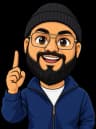
The cartoon on @theleakyfunnel is me, made from one photo and two prompts. Here are both, so you can make a mascot that stays on-model across every video.
Skip the reading: hand it to Claude
Copy the whole guide and paste it into Claude, or install it as a Claude Code skill so it’s always there.
Save it as ~/.claude/skills/turn-yourself-into-a-cartoon/SKILL.md, then ask Claude Code to “turn yourself into a cartoon mascot”.
The prompts
1. The mascot
Use with your photo as the reference image.
Turn the person in the reference photo into a FULLY CARTOONISH avatar character, clearly a cartoon and not a realistic portrait. Exaggerated proportions: oversized head about one third of total body height, small body, big friendly expressive eyes, simplified features. Keep what makes them recognisable: [YOUR GLASSES, HAIR OR BEARD, SKIN TONE]. They wear [YOUR SIGNATURE HAT OR ACCESSORY] and [YOUR OUTFIT]. Half-body from the waist up, facing camera, big confident grin, right hand raised beside the head with index finger pointing straight up. Transparent background, no text, no props, no ground shadow. Style: chunky 2D cartoon mascot for explainer videos, thick bold dark outlines, flat colours with one cel-shadow tone, rounded soft shapes, very clean vector look, like a modern animated YouTube explainer character.
2. A new pose
Use with your master cartoon as the reference image. Change only the last sentence.
Draw the EXACT same cartoon character as the reference image: identical face, [SAME HAT, GLASSES, HAIR], skin tone, [SAME OUTFIT], identical art style (chunky 2D mascot, thick bold dark outlines, flat colours with one cel-shadow tone, oversized head). Half-body from the waist up, same framing and scale as the reference, facing camera. Transparent background, no text, no props, no ground shadow. Pose and expression: [ONE HAND ON CHIN, LOOKING UP, THINKING / BOTH HANDS ON CHEEKS, SHOCKED / THUMBS UP, BIG GRIN].
Setup
Take a clear, front-facing photo in good light. Head and shoulders, nothing covering your face.
Upload it as the reference image and paste the mascot prompt. Fill in the parts in [BRACKETS] with what makes you recognisable.
Pick your favourite result. That cartoon is your master: keep it safe.
For every new pose, upload the master (not your photo) as the reference and paste the pose prompt with the pose you want.
Ask for a transparent background every time, so the cartoon drops straight onto any video or thumbnail.
What I use
- HiggsfieldWhat I use. Its GPT Image model takes a reference photo and can return a transparent background.
- Any image model that takes a reference imageChatGPT's image tool works too. The prompts are the important part.
Worth knowing
- Make the poses one at a time from the master. If you chain pose from pose, small changes add up and the face drifts.
- Write down the outfit details word for word and reuse them in every pose prompt. That's what keeps it on-model.